Playtest
Welcome to the Empyrean Defense Playtest!
Thank you for helping test and improve the game before early access release. This page explains how to activate your Playtest key, get started in game, and find answers to common questions.
How to Activate Your Playtest Key
Follow these steps to redeem your Playtest key on Steam:
- Open Steam.
- In the top-left menu, click Games → Activate a Product on Steam…
- Click Next, then I Agree to the Steam Subscriber Agreement.
- Enter your unique Playtest Key in the text box.
- Steam will automatically add Empyrean Defense Playtest to your Library.
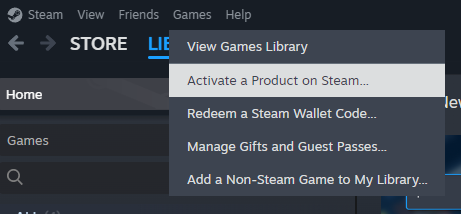
Once activated, you can download and launch the game like any other title.
Getting Started
Objective
Defend each region of the Empyrean Realm against Zharos’ invading forces.
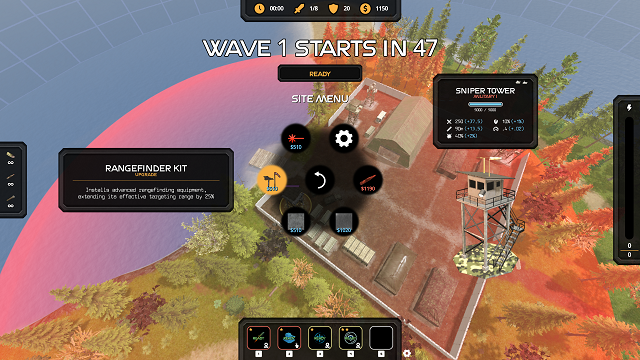
Build, upgrade, and strategically manage your defense sites to survive each wave.
Core Gameplay Loop
- Build Sites - Choose from military, economy, power, or support sites.
- Defend Against Waves - Enemy units advance along the map paths.
- Earn Credits - Defeating enemies and maintaining economy sites provides income.
- Upgrade & Adapt - Reinforce key sites to counter tougher enemy units.
Basic Controls
| Button | Action |
|---|---|
 + +  / /     / /  |
Move |
 / /  |
Zoom In |
 / /  |
Zoom Out |
 + / + /  |
Rotate View |
/  / /  |
Select / Confirm Use Ability |
/  / /  |
Cancel / Deselect |
 / /  / /  |
Pause / Settings |
Tips for Playtesters
- Use abilities to help get through more difficult waves. Assign abilities to hotkeys in the Abilities Page
- Invest in skills as you level up in the Skill Tree Page
- Use the Supply Depot to craft ammo and buy and sell resources, blueprints, and abilities
- Assign newly unlocked sites to Quick Menu hotkeys for quick building
- Try different tower targeting modes: First, Closest, and Last
- Keep an eye on any objectives using the Objectics Tracker during a mission to ensure victory
Reporting bugs or suggestions
Use the following links to submit bug reports or suggestions
Exporting Logs
Follow these steps to export all logs and prepare to submit for a bug report:
- Open the Settings menu in game
- Navigate to the Game tab
- Scroll down to find the Export Logs button and select it
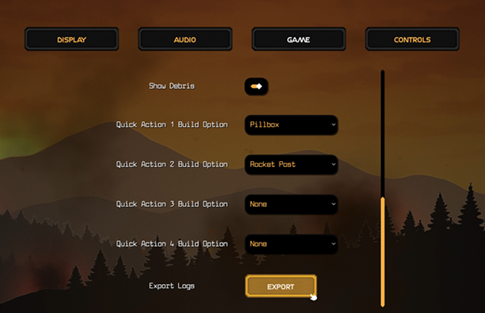
- You will see a popup message indicating the absolute path of the zipped logs package
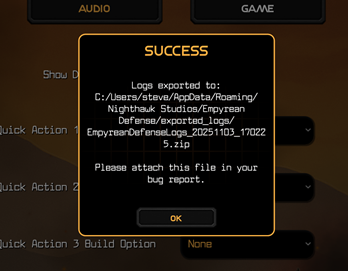
- Navigate to this directory and upload to the bug report when submitting
FAQ
Q: What settings can I change to improve performance or framerate? A: For the best performance on most systems, open the Settings menu and navigate to the Display tab. Try disabling Glow and Dynamic Shadows, and lowering Quality, Environment Draw Distance, Environment Detail. You may also see improvement by running the game in Windowed Mode instead of Fullscreen.
Q: Is my progress saved between sessions?
A: Yes - your save data is stored locally and synced via Steam Cloud to persist across devices and sessions.
Q: Can I stream or record gameplay?
A: Yes, feel free to share footage publicly and tag #EmpyreanDefense on social media.
Q: How do I report bugs or feedback?
A: Join the Empyrean Defense Discord (shared privately) to submit any bugs or suggestions.
Q: Will my progress carry over to Early Access?
A: Not guaranteed - progress may reset as the game evolves during development.
Q: How long will the Playtest run?
A: Playtest sessions are open for a limited time. Check announcements on Discord or Steam for dates.
Known Issues (v0.6.1)
- Occasional performance drops with Soldier and APC units
- Coin drops may clip through terrain on occassion
Join the Community
Get updates, share feedback, and connect with other players:
- Discord: Shared Privately
- Official Website: Nighthawk Studios
- Instagram: nighthawk.studios
Last updated: January 2026